Thursday, August 3, 2017

Saturday, July 8, 2017
How to use FVDI ABRITES Commander for Volvo V4.3
FVDI ABRITES Commander for Volvo
1. FVDI ABRITES Languages: English, German, Spanish, French, Portuguese, Russian, Italian, Danish, Czech, Bulgarian, Croatian, Greek, Hungarian, Polish, Romanian, Slovenian, Swedish, Turkish, Brazilian
2.FVDI ABRITES Commander for VOLVO is software for diagnostic of VOLVO vehicles over CAN bus
3. Buy FVDI Volvo get Hyundai/Kia/Tag Key Tool Software Free, besides you can get free 20 Digit Nissan Pin Code Calculator Software too
Features:
1. Languages: English, German, Spanish, French, Portuguese, Russian, Italian, Danish, Czech, Bulgarian, Croatian, Greek, Hungarian, Polish, Romanian, Slovenian, Swedish, Turkish, Brazilian
2. Buy FVDI Full Volvo get Hyundai/Kia/Tag Key Tool Software Free, besides you can get free 20 Digit Nissan Pin Code Calculator Software too
3. ABRITES Commander for VOLVO is software for diagnostic of VOLVO vehicles over CAN bus
4. Support Volvo Cars before Year 2012
5. Update: Before update, you need advise the FVDI ID first, we will check if the ID is in the update list which can be update by email, if not in the list, can not do it yourself. you need send back the multiplexer to us for updating. and you need pay for the shipping cost of it

The software can be only installed on WIN XP
V2015 FVDI INSTALLATION MANUAL

Step 1. Connect the Softdog to FVDI ABRITES . Do not connect Softdog to the computer, otherwise the Softdog green light or red light will on, and result in authorization fail.
Step 2. Use USB cable to connect FVDI 2015 and the computer, but do not connect FVDI to the car. Wait until FVDI green light on and Softdog red light on, you succeed getting authorization. If FVDI red light on or Softdog green light on, repeat the above steps.
After get authorization for FVDI 2015, follow the next steps to connect.
Step 1. Connect the Softdog to FVDI ABRITES (Note: do not connect Softdog to the computer).
Step 2. Use USB cable to connect FVDI ABRITES and the computer. Wait until FVDI green light on and Softdog red light on, connect Softdog USB cable to the computer. During the procedure, the Softdog red light keeps on (Note: do not connect FVDI to the car)
Step 3. Till the above 2 steps work well, connect FVDI ABRITES to the car.
Standard Diagnostic Functions:
1. For all electronic control units reading identification data
2. For all electronic control units read error (DTCs)
3. For all electronic control units clear error (DTCs)
4. Device scan
5. Data Display / Measured values
 |
| FVDI |
 | |
| FVDI |
==================================
24hour Online Customer Service:
E-mail:buyobd@gmail.com
Skype:Marshall.obd2
Whatsapp:86-13476108995
Skype:Marshall.obd2
Whatsapp:86-13476108995
HTTP://WWW.BUYOBDII.COM
==================================
Wednesday, July 5, 2017
What's the difference between FVDI Abrites and FVDI 2 Commander ?
FVDI Abrites vs FVDI 2 Commander
FVDI generation 2 includes Immobilizer,Odometer,CBS Reset,Airbag,Synchronize and Programming features etc. FVDI generation 2 and FVDI 2016 (generation 1) are two different products.
FVDI generation 1 use abritus original AVDI software, FVDI generation 2 is FLY Company own developed software. FVDI generation 2 made up for the inadequacy of FVDI generation 1, FVDI generation 2 is a supplement to the FVDI generation 1.
Update: Update Online
Operating system: Windows XP(SP2 or later) Professional,Windows 7 Ultimate and Windows 8 Professional
FVDI 2 Host
 FVDI 2 Host PCB
 FVDI Abrites Commander
from FLY company has been updated to FVDI generation II. FVDI 2 FULL
Version equals FVDI V2016 FULL Version + FLY OBD Terminator FULL Version
+ J2534 DrewTech Software.
FVDI Abrites Commander
from FLY company has been updated to FVDI generation II. FVDI 2 FULL
Version equals FVDI V2016 FULL Version + FLY OBD Terminator FULL Version
+ J2534 DrewTech Software.


FVDI generation 2 includes Immobilizer,Odometer,CBS Reset,Airbag,Synchronize and Programming features etc. FVDI generation 2 and FVDI 2016 (generation 1) are two different products.
FVDI generation 1 use abritus original AVDI software, FVDI generation 2 is FLY Company own developed software. FVDI generation 2 made up for the inadequacy of FVDI generation 1, FVDI generation 2 is a supplement to the FVDI generation 1.
Update: Update Online
Operating system: Windows XP(SP2 or later) Professional,Windows 7 Ultimate and Windows 8 Professional
FVDI 2 Host


=======================
E-mail:buyobd@gmail.com
Skype:Marshall.obd2
Whatsapp:86-13476108995
E-mail:buyobd@gmail.com
Skype:Marshall.obd2
Whatsapp:86-13476108995
Website : www.buyobdii.com
=======================
How to update 2016 FVDI to FVDI2 ?
2017 FVDI2 Commander For Toyota Lexus V9.0 With USB Dongle
If you bought the FVDI Commander from us, you need to send back your FVDI main unit and dongle to us. Pay more 300USD to update your unit to FVDI 2 with same software you have bought. We will send free J2534 software and corresponding FLY OBD Terminator software function.You bought the FVDI Mercedes, you send back the main unit and dongle to use, pay 300USD, you’ll receive FVDI2 with Mercedes software+ free 2534 software+FLY OBD Terminator Mercedes software function.
J2534 Software includes:
1.Honda HDS V3.016
2. JLR SDD V145.00
3.TIS Techstream V11.00.017
4.VCM IDS
5.etc
Note: If you have lost your dongle, you will be charged extra 90US$. Total 390US$ to update your FVDI to FVDI II.
If you have any questions, please contact our customer service www.buyobdii.com.
FLY OBD Terminator Software:


FVDI2 Abritus Software language:
1. VAG – VW, Audi, Seat, Skoda
Supported language: English, Germany, Spanish, French, Russian, Italian, Danish, Czech, Chinese, Bulgarian.;
2. Mercedes/Smart/Maybach
Supported language: English, Germany, Spanish, French, Italian, Danish, Romanian, Czech, Bulgarian.;
3. BMW
Supported language: English.;
4. OPEL/VAUXHALL
Supported language: English.;
5. Peugeot/Citroen
Supported languages: English, French, Turkish.;
6. Fiat/Alfa/Lancia
Supported language: English, Brazilian, Germany, Spanish, French, Russian, Italian, Danish, Czech, Bulgarian, Croatian, Greek, Hungarian, Polish, Portuguese, Romanian, Slovenian, Swedish, Turkish.;
7. Renault
Supported language: English.;
8. Toyota/Lexus
Supported language: English.;
9. Hyundai/KIA
Supported language: English, Czech, Spanish, French, Italian, Russian, Romanian, Bulgarian.;
10. Porsche
Supported language: English.;
11. Nissan/Infiniti
Supported language: English.;
12. Tag
Supported language: English.;
13. Ford
Supported language: English , German, French , Italian , Spanish , Dutch, Swedish , Finnish , Danish , Norwegian , Portuguese , Portuguese (Brazilian), Greek, Turkish, Hungarian, Czech, Slovenian, Polish, Russian, Chinese , Japanese, Thai , Chinese Simplified , Romanian.;
14. Volvo
Supported language: English , German, French , Italian , Spanish , Dutch, Swedish , Finnish , Danish , Norwegian , Portuguese , Portuguese (Brazilian), Greek, Turkish, Hungarian, Czech, Slovenian, Polish, Russian, Chinese , Japanese, Thai , Chinese Simplified , Romanian.;
15. Chrysler, Dodge and Jeep
Supported language: Brazilian ,Bulgarian ,Croation ,Czech, Danish ,Greek, Hungarian, Italian ,Polish, Portuguese , Romanian ,Russian ,Slovenian, Spanish ,Swedish ,Turkish.;
16. Mitsubishi
Supported language: Brazilian ,Bulgarian ,Croation ,Czech, Danish ,Dutch, English , German, French , Greek, Hungarian, Italian ,Polish, Portuguese , Romanian ,Russian ,Slovenian, Spanish ,Swedish ,Turkish.;
17. DAF
Supported languages: Bulgarian , Chinese(Simplified) , Chinese(Traditional) , Croation , Czech , Danish , Dutch , English , Finish , German , Greek , Hungarian , Indonesian , Italian , Japanese , Korean , Norwegian , Polish.;
18. Bikes, Snowmobiles and Water scooters
Supported languages: Finnish ,French ,German ,Greek ,Hungarian , Indonesian ,Italian , Japanese ,Korean ,Norwegian ,Polish ,Romanian ,Russian ,Slovenian, Spanish ,Swedish ,Thai ,Turkish.;
FVDI 2 for FLY OBD Terminator Software language:
Supported language: English , Simplified Chinese , Traditional Chinese.
Tuesday, July 4, 2017
Can I use the original AVDI with this FVDI 2014?
Can I use the original AVDI with this FVDI 2014?
Our FVDI 2014 both software and hardware can not compatible with the original AVDI.so you could only use our hardware and software together. |
| 2014v fvdi |
1* Main Unit
1* OBD-16pin Cable
1* USB Cable
1* For TAG Tool
1* For Benz Cable 1
1* For BENZ Cable 2
1* For Benz Adapter 1
1* For BENZ Adapter 2
1* For BENZ Adapter 3
1* For BENZ Adapter 4
1* For Carton Case
1* For VAG Adapter
1* For VAG and B-MW Cable
1* For B-MW CAS Adapter
2014V FVDI ABRITES Commander 18 in 1 Without USB Dongle No Time Limited
FVDI 2014 ABRITES Commander 18 in 1 Introduction:
Model name:FVDI Full 2014V
Software Version:18 brand softwares ,different versions
Update:No Update Now
Car Models:Multi-cars
Languages:Multi-languages
Functions:Diagnose + Odometer Correction+ Key Programmer + ECU Programmer
Connection:By OBD2.
Install/User Note:
1. This FVDI ABRITES don't support software updating. And it can't be returned. All 18 software have been activated, you can use it forever without limited.
2. Please uninstall anti-virus software and firewalls when you install software.
3.This version is without USB dongle 2014v,2014V don't support special functions, which need Dongle to deal with.

24hour Online Customer Service:
E-mail:buyobd@gmail.com
Skype:Marshall.obd2
Whatsapp:86-13476108995
Monday, July 3, 2017
How to install full FVDI 2015 abrites commander on windows 7 ?

FVDI 2015 Full Version Description
Basic Function:
1. Reading Pin code by OBDII
2. Programming keys by OBDII. Preparation of dealer's keys.
3. Mileage recalibration by OBDII
4. Clearing crash data DTCs by OBDII
5. Read/Program flash memory of engine control units by OBDII. Options for resetting the number of flashing attempts.
6. Exchange speed limit of MMI-TV system
7. Coding calculator - supported short/long coding
8. Synchronization/Adaptation KESSY and ELV
9. Operation Notes:
the recommended system:
1-Windows XP Professional Edition
2-Windows 7 Ultimate Editio
Friday, June 30, 2017
FVDI 2014 ABRITES Commander 18 in 1 Full Version No Time Limited
FVDI 2014 ABRITES Commander 18 in 1 Without USB Dongle No Time Limited
As we all know, FVDI ABRITES Commander tool is based on AVDI,is a very powerful tool.FVDI 2014V support diagnose,ecu prog,key prog ,also mileage correction in same time.
Here ,we want to share for all customer about our FVDI ABRITES Commander 18 in 1 Full Version Software.
http://buyobdii.com/2014v-fvdi-abrites-commander-18-in-1-without-usb-dongle-no-time-limited-p-712.html
Once you install the FVDI scanner well,you can open every models,here we open VAG software for you.In FVDI 2014V,the VAG software version is 21V,while in 2016 FVDI software,the VAG Version is V24.
If you want to buy updated version,you can buy here:
http://buyobdii.com/2016v-fvdi-abrites-commander-18-in-1-with-usb-dongle-no-limited-support-special-functions-p-633.html
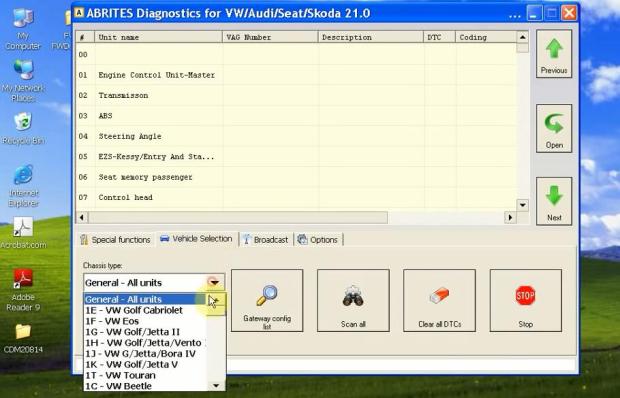
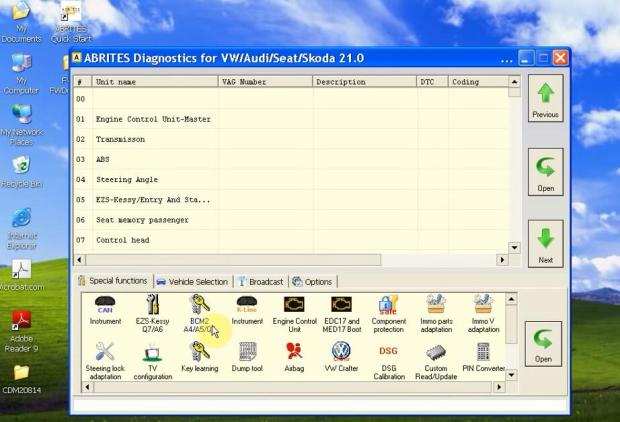 Above is the functions fvdi could do.Also,you can connect with your car ,and find your car models below:
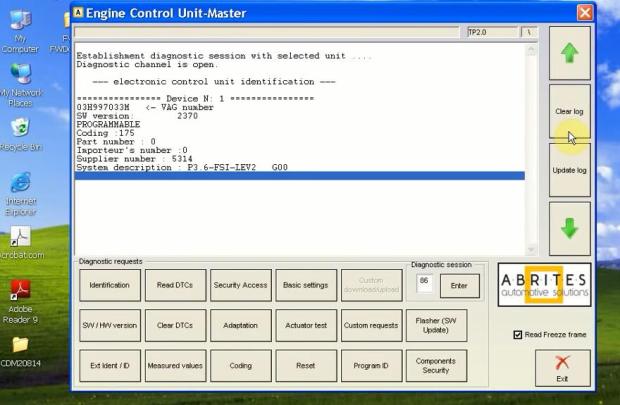
For example,you can check DTC function:
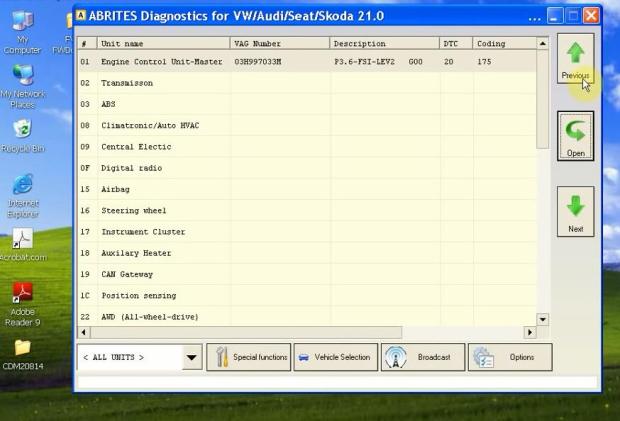
Well done the Job Now!
Also,so manys EU customers want to know,does the fvdi support multi-language?
Yes.
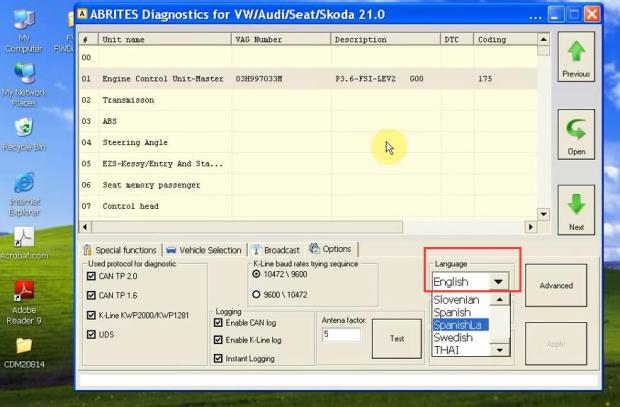
FVDI language:
1. ABRITES Commander for VAG – VW, Audi, Seat, Skoda Supported languages: English, Germany, Spanish, French, Russian, Italian, Danish, Czech, Chinese, Bulgarian.;
2. ABRITES Commander for Mercedes/Smart/Maybach Supported languages: English, Germany, Spanish, French, Italian, Danish, Romanian, Czech, Bulgarian.;
3. ABRITES Commander for B-MW Supported languages: English.;
4. ABRITES Commander for OPEL/VAUXHALL Supported languages: English.;
5. ABRITES Commander for P-eugeot/C-itroen Supported languages: English, French, Turkish.;
6. ABRITES Commander for F-iat/Alfa/Lancia Supported languages: English, Brazilian, Germany, Spanish, French, Russian, Italian, Danish, Czech, Bulgarian, Croatian, Greek, Hungarian, Polish, Portuguese, Romanian, Slovenian, Swedish, Turkish.;
7. Abrites Commander for Renault Supported languages: English.;
8. Abrites Commander for Toyota/L-exus Supported languages: English.;
9. Abrites Commander for H-yundai/KIA Supported languages: English, Czech, Spanish, French, Italian, Russian, Romanian, Bulgarian.;
10. ABRITES Commander for P-orsche Supported languages: English.;
11. ABRITES Commander for Ni-ssan/Infiniti Supported languages: English.;
12. ABRITES Commander for Tag Supported languages: English.;
13. ABRITES Commander for F-ord Supported languages: English , German, French , Italian , Spanish , Dutch, Swedish , Finnish , Danish , Norwegian , Portuguese , Portuguese (Brazilian), Greek, Turkish, Hungarian, Czech, Slovenian, Polish, Russian, Chinese , Japanese, Thai , Chinese Simplified , Romanian.;
14. ABRITES Commander for V-olvo Supported languages: English , German, French , Italian , Spanish , Dutch, Swedish , Finnish , Danish , Norwegian , Portuguese , Portuguese (Brazilian), Greek, Turkish, Hungarian, Czech, Slovenian, Polish, Russian, Chinese , Japanese, Thai , Chinese Simplified , Romanian.;
15. ABRITES Commander for Chrysler, Dodge and J-eep Supported languages: Brazilian , Bulgarian , Croation , Czech, Danish , Greek, Hungarian, Italian , Polish, Portuguese , Romanian , Russian , Slovenian, Spanish , Swedish , Turkish.;
16. ABRITES Commander for Mitsubishi Supported languages: Brazilian , Bulgarian , Croation , Czech, Danish , Dutch, English , German, French , Greek, Hungarian, Italian , Polish, Portuguese , Romanian , Russian , Slovenian, Spanish , Swedish , Turkish.;
17. ABRITES Commander for DAF Supported languages: Bulgarian , chinese(Simplified) , Chinese(Traditional) , Croation , Czech , Danish , Dutch , English , Finish , German , Greek , Hungarian , Indonesian , Italian , Japanese , Korean , Norwegian , Polish.;
18. ABRITES Commander for Bikes, Snowmobiles and Water scooters Supported languages: Finnish , French , German , Greek , Hungarian , Indonesian, Italian, Japanese , Korean , Norwegian , Polish , Romanian , Russian , Slovenian, Spanish, Swedish , Thai , Turkish.
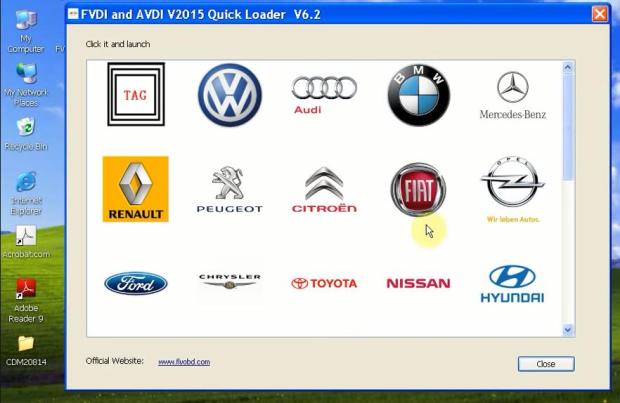
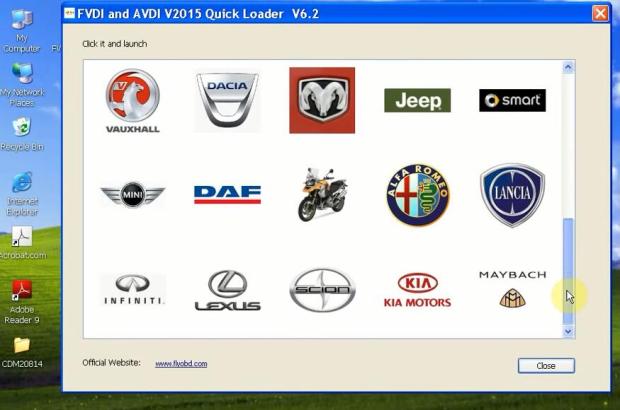
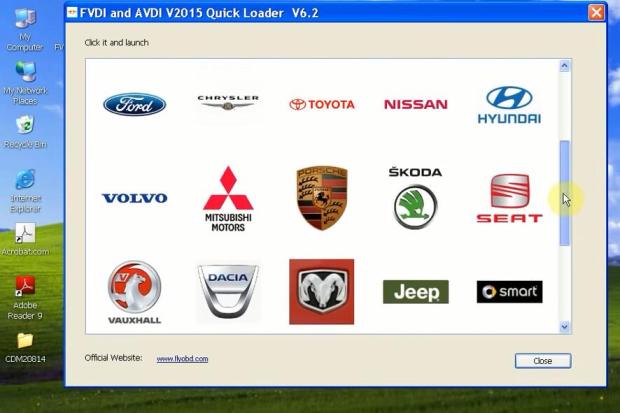
As we all know, FVDI ABRITES Commander tool is based on AVDI,is a very powerful tool.FVDI 2014V support diagnose,ecu prog,key prog ,also mileage correction in same time.
Here ,we want to share for all customer about our FVDI ABRITES Commander 18 in 1 Full Version Software.
http://buyobdii.com/2014v-fvdi-abrites-commander-18-in-1-without-usb-dongle-no-time-limited-p-712.html
Once you install the FVDI scanner well,you can open every models,here we open VAG software for you.In FVDI 2014V,the VAG software version is 21V,while in 2016 FVDI software,the VAG Version is V24.
If you want to buy updated version,you can buy here:
http://buyobdii.com/2016v-fvdi-abrites-commander-18-in-1-with-usb-dongle-no-limited-support-special-functions-p-633.html
For example,you can check DTC function:
Well done the Job Now!
Also,so manys EU customers want to know,does the fvdi support multi-language?
Yes.
FVDI language:
1. ABRITES Commander for VAG – VW, Audi, Seat, Skoda Supported languages: English, Germany, Spanish, French, Russian, Italian, Danish, Czech, Chinese, Bulgarian.;
2. ABRITES Commander for Mercedes/Smart/Maybach Supported languages: English, Germany, Spanish, French, Italian, Danish, Romanian, Czech, Bulgarian.;
3. ABRITES Commander for B-MW Supported languages: English.;
4. ABRITES Commander for OPEL/VAUXHALL Supported languages: English.;
5. ABRITES Commander for P-eugeot/C-itroen Supported languages: English, French, Turkish.;
6. ABRITES Commander for F-iat/Alfa/Lancia Supported languages: English, Brazilian, Germany, Spanish, French, Russian, Italian, Danish, Czech, Bulgarian, Croatian, Greek, Hungarian, Polish, Portuguese, Romanian, Slovenian, Swedish, Turkish.;
7. Abrites Commander for Renault Supported languages: English.;
8. Abrites Commander for Toyota/L-exus Supported languages: English.;
9. Abrites Commander for H-yundai/KIA Supported languages: English, Czech, Spanish, French, Italian, Russian, Romanian, Bulgarian.;
10. ABRITES Commander for P-orsche Supported languages: English.;
11. ABRITES Commander for Ni-ssan/Infiniti Supported languages: English.;
12. ABRITES Commander for Tag Supported languages: English.;
13. ABRITES Commander for F-ord Supported languages: English , German, French , Italian , Spanish , Dutch, Swedish , Finnish , Danish , Norwegian , Portuguese , Portuguese (Brazilian), Greek, Turkish, Hungarian, Czech, Slovenian, Polish, Russian, Chinese , Japanese, Thai , Chinese Simplified , Romanian.;
14. ABRITES Commander for V-olvo Supported languages: English , German, French , Italian , Spanish , Dutch, Swedish , Finnish , Danish , Norwegian , Portuguese , Portuguese (Brazilian), Greek, Turkish, Hungarian, Czech, Slovenian, Polish, Russian, Chinese , Japanese, Thai , Chinese Simplified , Romanian.;
15. ABRITES Commander for Chrysler, Dodge and J-eep Supported languages: Brazilian , Bulgarian , Croation , Czech, Danish , Greek, Hungarian, Italian , Polish, Portuguese , Romanian , Russian , Slovenian, Spanish , Swedish , Turkish.;
16. ABRITES Commander for Mitsubishi Supported languages: Brazilian , Bulgarian , Croation , Czech, Danish , Dutch, English , German, French , Greek, Hungarian, Italian , Polish, Portuguese , Romanian , Russian , Slovenian, Spanish , Swedish , Turkish.;
17. ABRITES Commander for DAF Supported languages: Bulgarian , chinese(Simplified) , Chinese(Traditional) , Croation , Czech , Danish , Dutch , English , Finish , German , Greek , Hungarian , Indonesian , Italian , Japanese , Korean , Norwegian , Polish.;
18. ABRITES Commander for Bikes, Snowmobiles and Water scooters Supported languages: Finnish , French , German , Greek , Hungarian , Indonesian, Italian, Japanese , Korean , Norwegian , Polish , Romanian , Russian , Slovenian, Spanish, Swedish , Thai , Turkish.
At last,we share about 18 models we had in FVDI full scanner.
24hour Online Customer Service:
E-mail:buyobd@gmail.com
Skype:Marshall.obd2
Whatsapp:86-13476108995
Skype:Marshall.obd2
Whatsapp:86-13476108995
Subscribe to:
Posts (Atom)
-
2018 Fvdi Loader error 5 problem Solution introduction Customers may get the following problem: Installing fvdi ABRITES Commander softwa...
-
FVDI 2015 ABRITES Commander 18 in 1 Introduction: Model name : 2015 FVDI Full with Usb Dongle,100% Working!!! Software Version:18 brand ...
-
How to use FVDI 2016 usb dongle FVDI 2016 ABRITES Commander 18 in 1 Introduction: Model name:FVDI Full with Usb Dongle, 100% Working!!!...


